CI/CD Pipeline
The Shopnow project source code is managed on GitHub, where Developers will commit and push code to the repository. The project includes Frontend and Backend so the CI/CD process will be performed separately for 2 parts but the architecture is the same. For convenience in deploying the pipeline, we will proceed to create tags when we want the CI/CD process to be triggered. Therefore, the architecture diagram will be implemented as follows:
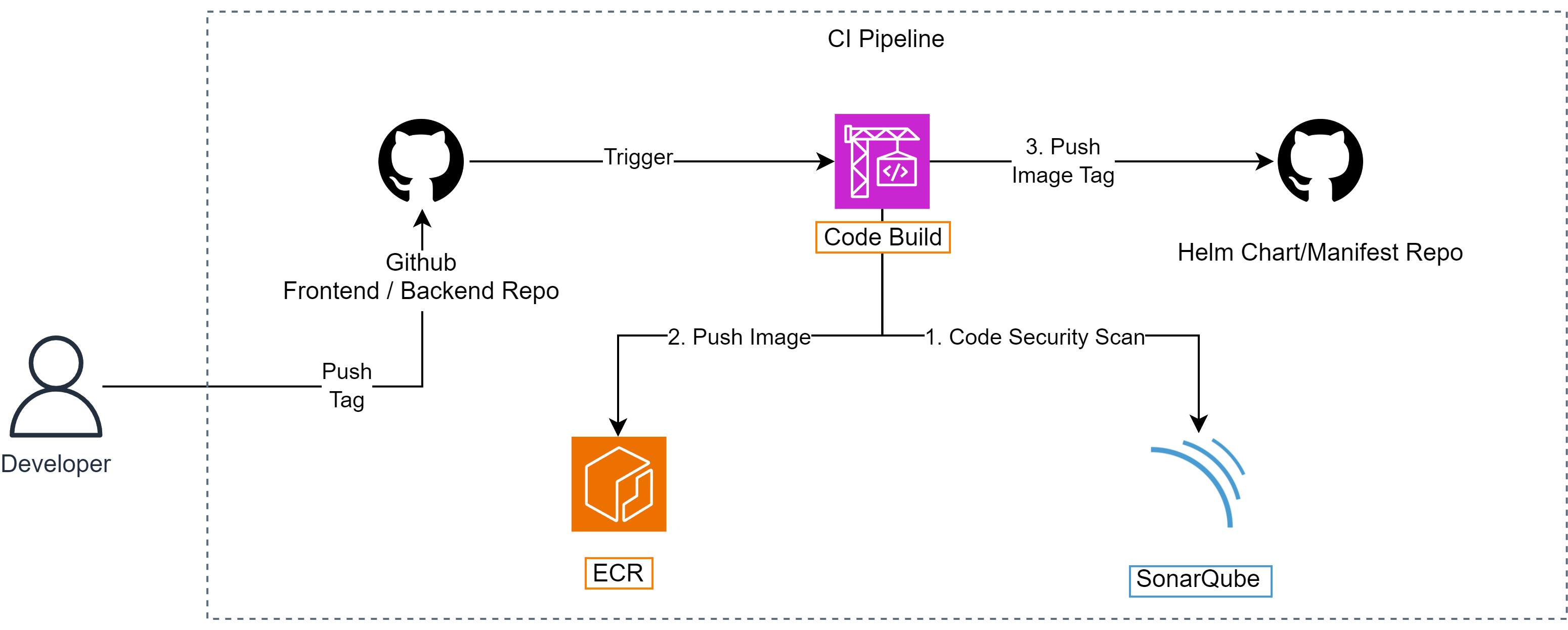
The system is configured to trigger AWS CodeBuild whenever an event is triggered from the repository. CodeBuild will deploy the entire workflow from source code management to performing build processes and SonarQube to ensure code quality. Finally, container images are built, scanned and pushed to Amazon ECR to be ready for deployment to the EKS environment. After the Image is built successfully, CodeBuild will proceed to push the new Image Tag to the repository containing the values.yaml file so ArgoCD can deploy to the EKS environment. Thus the CI process will be performed by CodeBuild, while the CD process will be performed by ArgoCD.
Detailed Workflow
In the Shopnow project, AWS CodeBuild is configured to perform the entire CI/CD process. Whenever an event is triggered from the repository (such as when there’s a new tag in GitHub), CodeBuild will perform the following steps:
Pull code from repository: CodeBuild clones source code from GitHub repository.
Install dependencies: Install necessary libraries and tools for the build process.
Scan and check code quality with SonarQube: Analyze code quality, security vulnerabilities, and code coverage.
Build Docker image from source code: Create container image with corresponding version tag.
Push image to Amazon ECR: Push scanned image to ECR registry.
Update image tag in configuration file (values.yaml): Automatically update new image tag to repository containing Helm charts.
Commit and push updated configuration file to GitHub: So ArgoCD can detect changes and deploy.
This process ensures complete automation from code commit to deployment, with clear separation between CI (CodeBuild) and CD (ArgoCD).
AWS CodeBuild

AWS CodeBuild is a fully managed build service that allows you to compile source code, run tests and create deployment-ready artifacts. Unlike traditional build servers, CodeBuild doesn’t require you to provision or manage any servers. You just need to define a buildspec.yml configuration file to describe in detail the steps to be performed during the build process.
Key features of AWS CodeBuild:
Buildspec File (buildspec.yml): This is a configuration file in the repository, defining steps such as installing dependencies, building Docker image, scanning source code with SonarQube or Trivy, and pushing image to Amazon ECR.
IAM Integration: CodeBuild uses IAM Role with granted permissions to securely access other services like ECR, S3, or Secrets Manager.
Build environment options: You can use standard build environment provided by AWS, or customize your own Docker Image suitable for the project.
Logging and Debug: All logs from the build process are sent to Amazon CloudWatch Logs, making it easy to monitor and debug if errors occur.
Amazon Elastic Container Registry (ECR)

Amazon ECR is a fully managed container registry service by AWS, allowing development teams to store, manage and deploy container images securely and efficiently. In the Shopnow project, ECR serves as the central storage for all Frontend and Backend images after being built and scanned in the CI/CD stage.
Reasons for choosing Amazon ECR for the Shopnow project:
Seamless integration with CodeBuild and EKS: After CodeBuild successfully performs the build step and container security check, the image will be pushed directly to ECR. From there, EKS can pull this image to deploy the application.
IAM authentication support: ECR integrates with AWS’s permission system, helping manage access more securely without needing to create separate user/password for the registry.
High scalability: ECR can handle hundreds of different image versions from multiple pipelines, efficiently supporting even large microservices systems.
Github Repository
GitHub is the most popular source code management platform today, providing comprehensive features supporting modern software development such as version management (Git), pull request, issue tracker, CI/CD integration and security. With AWS CodeCommit no longer being prioritized for use, GitHub becomes a reasonable and optimal choice for the Shopnow project. Based on Access Key from Github, CodeBuild can commit to the repository containing configuration files so ArgoCD can deploy to the EKS environment.
Reasons for choosing GitHub for the Shopnow project:
High stability: GitHub is widely used in the software development community and integrates well with many CI/CD tools like CodeBuild, CodePipeline, Jenkins, GitHub Actions, etc.
Clear code version management: Frontend and backend teams can work on the same repository or separately, using branches and tags to control deployment versions.
GitOps Workflow support: GitHub not only stores application source code but can also contain Kubernetes configuration files, Helm Charts or Kustomize, helping seamlessly deploy GitOps with ArgoCD.