AWS Architecture
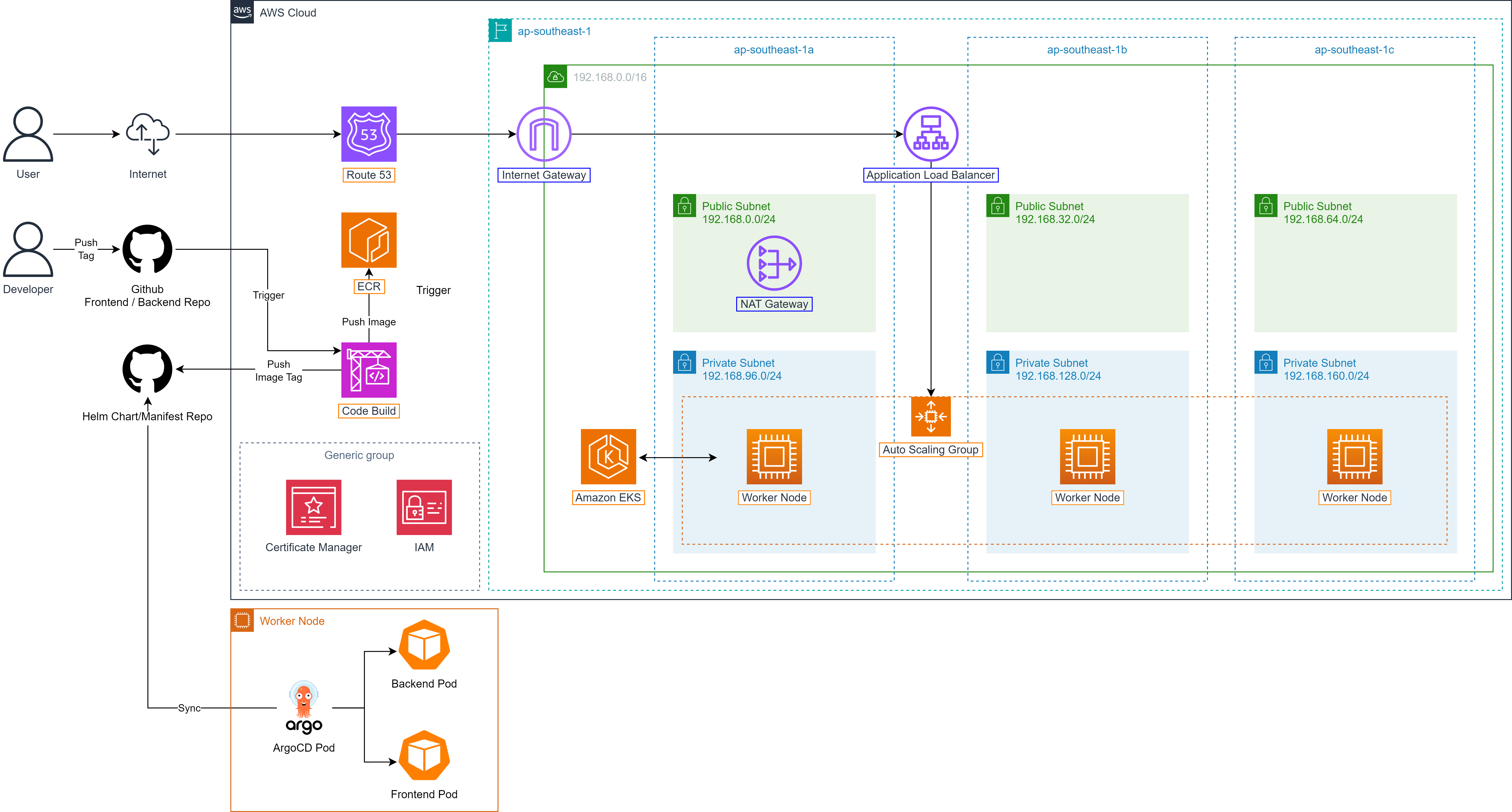
ShopNow applies microservices architecture and is deployed entirely on Amazon EKS to leverage the scalability, management and high availability capabilities of Kubernetes on AWS.
Frontend and backend components of the system are packaged as Helm Charts, helping standardize the deployment process and easily manage versions. Deployment of these components to EKS is automated through ArgoCD, ensuring consistency and configuration control capability according to GitOps. Additionally, PostgreSQL database is deployed separately using Kustomize.
AWS EKS (Elastic Kubernetes Service)

AWS EKS is a fully managed Kubernetes service provided by Amazon Web Services. It allows you to deploy, manage and scale containerized applications without having to operate the Kubernetes control plane yourself.
If you want to deploy Kubernetes on on-premise or EC2 manually, you must:
Install and configure Kubernetes control plane (API server, etcd, scheduler…).
Manage security, updates, scaling.
Configure networking (CNI, LoadBalancer, DNS…).
Integrate with IAM, Load Balancer, Autoscaling…
AWS EKS eliminates these manual steps by automatically deploying and operating the control plane according to high availability and security standards.
EKS integrates closely with other AWS services such as IAM (access management), VPC (networking), CloudWatch (monitoring), and ALB (Load Balancer), providing flexible, secure and scalable operations. Additionally, EKS fully supports popular tools like kubectl, Helm, ArgoCD, making it easy to integrate into CI/CD and GitOps processes. This is an ideal choice for deploying large-scale containerized applications on cloud platform.
AWS EKS Components
EKS consists of 2 main components:
Control Plane (managed by AWS)
The brain of Kubernetes, operating all cluster activities. Includes components: Kubernetes API server, etcd (storage), controller manager, scheduler.
Deployed across multiple Availability Zones (AZ) → Ensures high availability (HA).
AWS is responsible for operating, updating, and securing these components.
Worker Nodes (managed by you or using AWS Fargate)
Are EC2 instances or serverless pods (Fargate) running actual applications, containers (pods) run on these nodes.
Can be created manually or using eksctl.
Connect to control plane through kubelet.
Container runtime: Run containers (usually containerd).
CNI plugin: Set up networking for pods (using Amazon VPC CNI).
eksctl
eksctl is the official CLI (Command Line Interface) provided by AWS and Weaveworks to help you create, manage and delete Kubernetes clusters on Amazon EKS simply and quickly. Instead of having to configure complexly by hand (via AWS Console or CloudFormation), you only need a few commands or a YAML file with eksctl to automatically create all necessary architecture for an EKS cluster.
eksctl uses AWS CLI credentials (Access Key and Secret Key) or IAM Role (if used in EC2) to execute API calls to AWS. Permissions are controlled through IAM policy attached to IAM user or IAM role.
To be able to execute these commands, you need to have access to your AWS account through AWS CLI.
eksctl create cluster --name workshop-2-cluster --region ap-southeast-1 --without-nodegroup
eksctl will initialize a new EKS Cluster named workshop-2-cluster in the ap-southeast-1 region. Specifically, AWS will create and manage the Control Plane for you, including components such as API Server, etcd, Controller, and Scheduler.
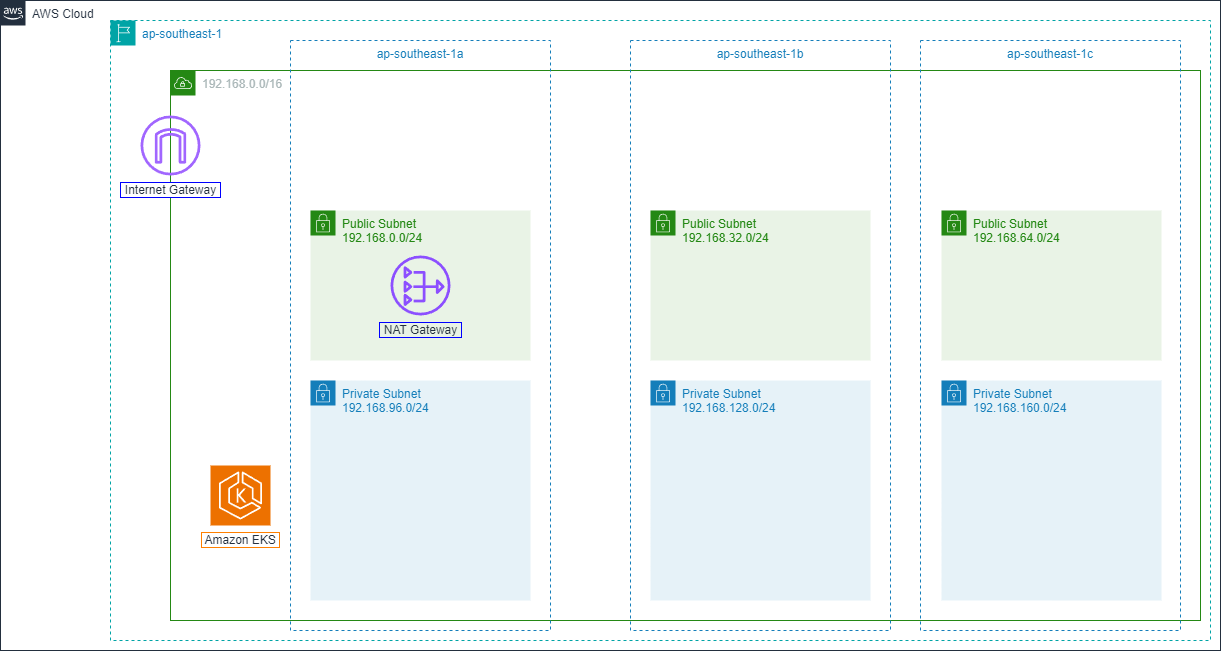
Additionally, eksctl also automatically sets up complete network infrastructure, including:
Dedicated VPC for cluster,
Public and private subnets spread across multiple Availability Zones,
Route Table, Security Groups,
Internet Gateway for public subnets,
NAT Gateway for private subnets.
With the --without-nodegroup flag, eksctl will not create worker nodes for the cluster.
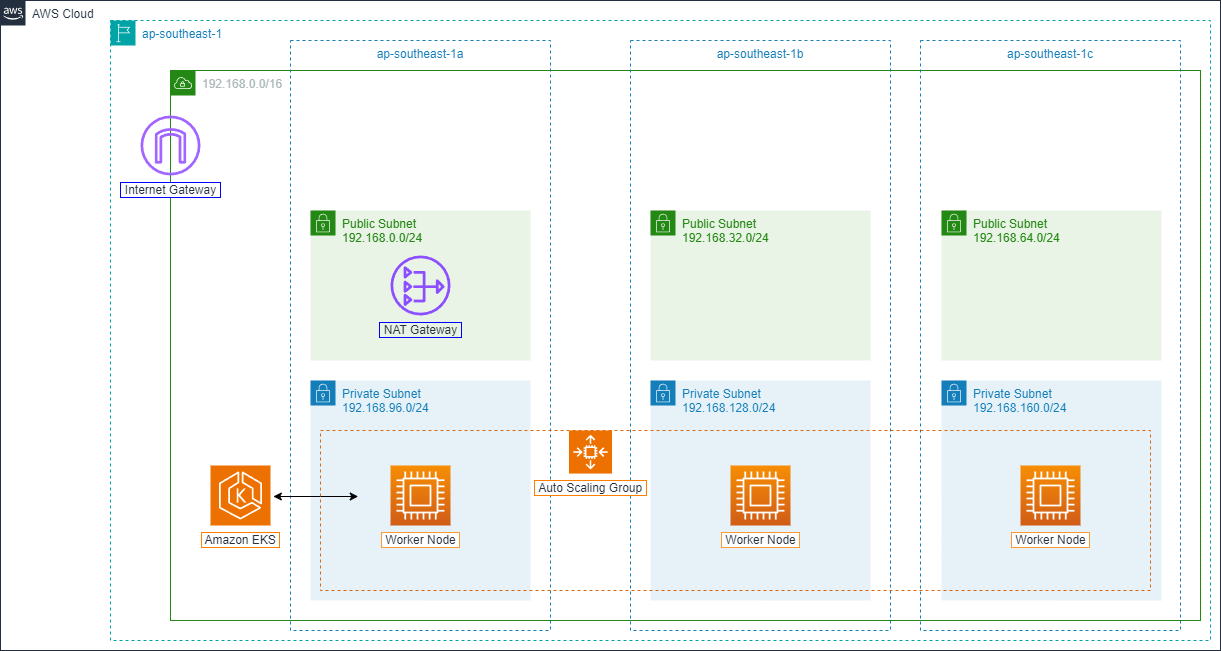
Next we will create worker nodes for the cluster by using CLI or a YAML file to configure Node Group. The --node-private-networking flag will create private subnets for the cluster helping ensure better security.
eksctl create nodegroup \
--cluster=workshop-2-cluster \
--region=ap-southeast-1 \
--name=workshop-2-node-group \
--node-type=t3.medium \
--nodes=3 \
--nodes-min=3 \
--nodes-max=6 \
--node-volume-size=20 \
--node-volume-type=gp3 \
--node-private-networking \
--managed \
--enable-ssm \
--ssh-access=false
Route 53

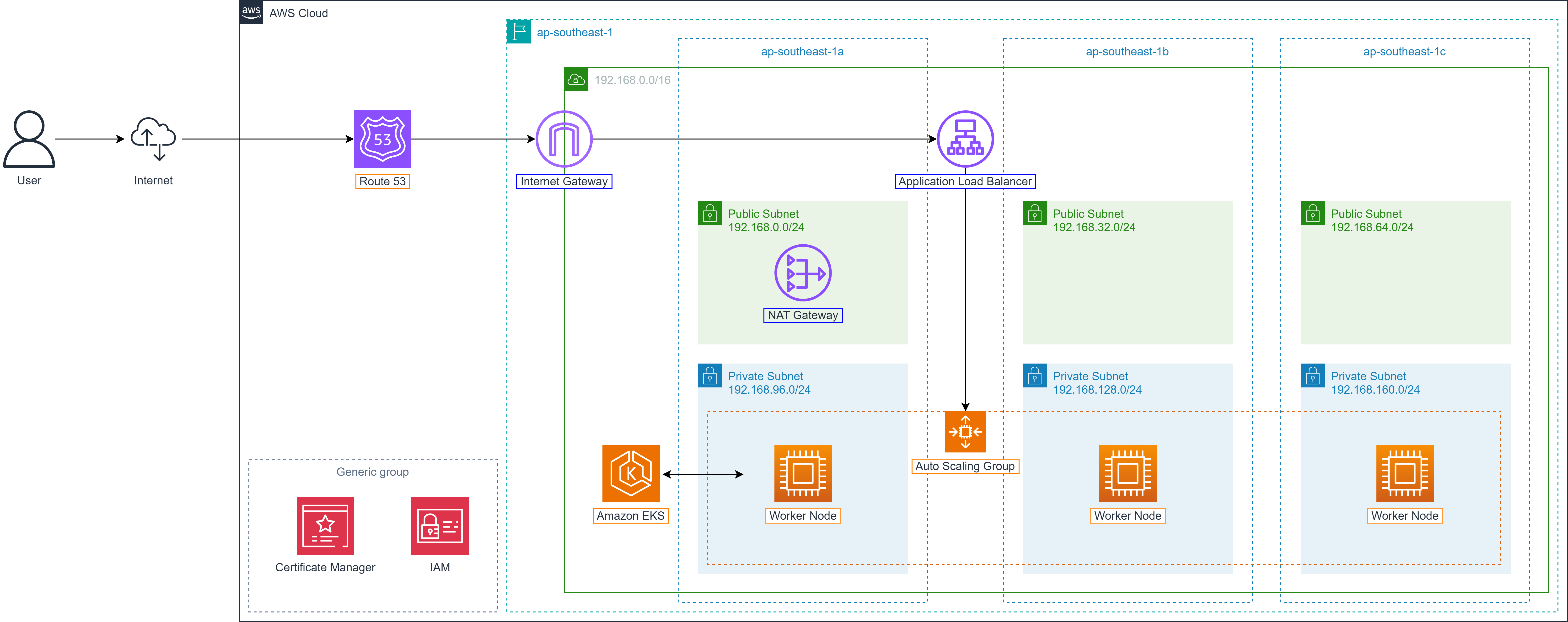
During the deployment of the Shopnow system on AWS, routing users to the correct backend or frontend service is an important factor, especially when the system is deployed on EKS and has many different internal services. To ensure stable access, security and easy domain management, the Shopnow project uses Amazon Route 53 combined with dedicated Hosted Zone to manage DNS for the entire system.
In the architecture below, Route 53 serves as the central DNS system:
When Ingress Controller is initialized on EKS, an External Load Balancer (ELB) address will be created automatically. Route 53 will be configured to map corresponding domain/subdomain to this ELB address through A or CNAME records.
Each component of the system (frontend, backend, Keycloak, Kong Gateway, etc.) is assigned a separate subdomain, helping management, monitoring and access become clearer and more efficient.
Shopnow’s Hosted Zone (e.g., tranvix.click) is created in Route 53 to centrally manage all DNS records such as:
shopnow.tranvix.clickfor user interfacekong-proxy.tranvix.clickfor API Gatewaykeycloak.tranvix.clickfor authentication serviceAnd other records for internal services like user-service, product-service, cart-service…
Through using Route 53 with hosted zone, the Shopnow system ensures:
Access through clear, memorable domain
Easy support for SSL configuration with cert-manager
Increased availability through tight integration with other AWS services
Easy subdomain expansion when adding new services
This DNS architecture helps Shopnow have a solid foundation to deploy distributed, multi-service systems, and ensure seamless experience for end users through custom domains.
AWS Certificate Manager

AWS Certificate Manager (ACM) is a service provided by AWS to manage SSL/TLS certificates automatically and securely. ACM allows you to easily request, provision, install and renew digital certificates used to encrypt communication between client and services such as ELB, CloudFront or API Gateway.
In the Shopnow system, ACM plays a central role in provisioning TLS certificates for subdomains such as:
shopnow.tranvix.click– Frontend user interface.keycloak.tranvix.click– Authentication service.kong-proxy.tranvix.click– API Gateway.
Combined with ALB Ingress Controller, ACM helps the system use HTTPS completely, ensuring security and increasing user trust.
Why use ACM:
Free for public certificates from AWS.
Automatic certificate renewal (no manual operation needed).
Good integration with AWS services like ELB, CloudFront, API Gateway.
Centralized management of all certificates on AWS.
Compatible with ALB Ingress Controller when deploying EKS.
Connection between ACM, Ingress and Route 53:
When an Ingress is initialized in EKS and attached to ALB, you can specify certificate from ACM to enable HTTPS.
ACM needs to be provisioned first and linked to the correct domain/subdomain in Route 53.
Route 53 provides DNS records to validate domain ownership (DNS validation) so ACM can provision certificates.