Introduction to GitOps Workflow
GitOps is an operational framework that helps automate software deployment and infrastructure management by applying DevOps principles such as CI/CD (continuous integration and deployment) and source code management with Git.
The core point of GitOps is storing all information about the desired state of the system (including application source code, configuration, and infrastructure) in a Git repository. When changes occur, GitOps will automatically sync those changes with the actual environment — helping reduce manual operations, increase consistency and reliability in deployment.
Why is it called GitOps?
GitOps extends how developers already use Git to manage source code, to managing both infrastructure and operations. Now, everything from application configuration, infrastructure files (Infrastructure as Code), to deployment processes are managed as code in Git.
What can GitOps do?
Automatically deploy software and infrastructure when there are changes in Git.
Track all change history as an audit log — easily trace errors or roll back to previous stable states.
Ensure the real environment always matches the state described in Git.
Self-recover if the system is changed incorrectly compared to the configuration in Git.
With GitOps, deploying software and infrastructure on Kubernetes is automated, synchronized, and controlled through Git. Declare state in Git → GitOps will ensure it matches the actual cluster state and support multi-cluster and multi-environment deployment.
Challenges when implementing GitOps
GitOps brings many attractive benefits, but it’s not always “smooth sailing”. Understanding common challenges will help you avoid trouble during implementation. The following example is about one of the common challenges when implementing GitOps:
Automatic updates to Git can easily cause conflicts
When implementing GitOps, CI/CD processes often need to update new state to Git – such as creating pull requests or committing new configuration after successful builds. If both application source code and infrastructure configuration are in the same Git repository, then when the CI/CD process runs successfully it will commit to the infrastructure configuration file, which can trigger the CI/CD process again, and this process can continue to loop, leading to creating many commits to the same file, causing loops and conflicts.
Solution: Need to clearly separate source code repo and GitOps repo, Don’t let CI/CD pipeline both build applications and modify deployment configuration files (Helm/Kustomize) in the same repo.
Not easy to manage Secrets
GitOps requires all configuration to be versioned and stored in Git, but this is not suitable for secrets (passwords, tokens, API keys…). Storing secrets in Git – even encrypted – still poses risks, because Git keeps all change history and it’s very difficult to completely remove sensitive information if exposed.
Solution: Combine GitOps with specialized secret management tools like HashiCorp Vault, SOPS + KMS to keep secrets safe outside Git. These tools support integration with ArgoCD or Flux to automatically decrypt secrets during deployment.
GitOps Workflow
Git is commonly used to store application source code. GitOps extends this practice to application configuration, infrastructure, and operational processes.
All changes at both application and infrastructure levels are automated through the version control system (Git), serving as the single source of truth. A GitOps controller will be responsible for ensuring the state in Git always matches the actual state of the system in both directions, meaning both updating the cluster according to Git and detecting changes on the cluster that don’t originate from Git.
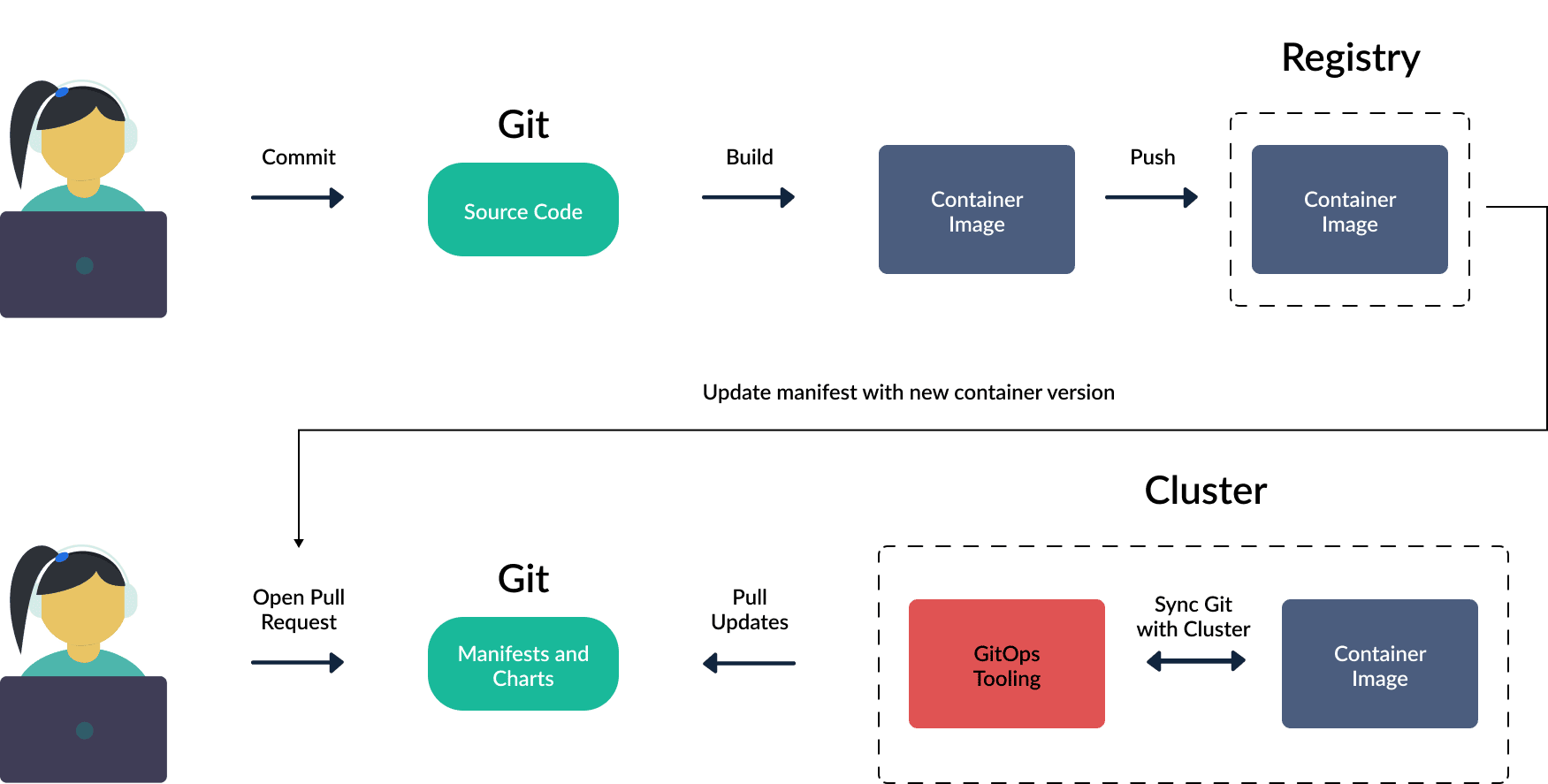
Basic GitOps process for Kubernetes
Developer commits changes to the Git repository containing application source code. A container image will be created and pushed to the container registry.
Container registry is where container images are stored. An image contains everything the application needs to run.
There is a second Git repository used to store the application’s deployment configuration. In GitOps architecture, this is where the desired state of the system is defined. For projects using Kubernetes, this repository will contain deployment configuration files in the form of Helm charts, Kustomize and pure YAML manifests. These configurations fully describe how the application is deployed on the cluster including Deployment, Service, ConfigMap, Secret and configuration parameters for container images. All changes to infrastructure or deployment methods are done through Git, helping ensure control, consistency and auditability.
Any changes in the Git repository are monitored by the GitOps agent. When changes are detected, the application (or infrastructure) deployment process will automatically occur. Requests to change the desired state of the cluster will trigger automatic synchronization through Argo CD (or other GitOps tools).
The system will monitor the application and compare the current actual state with the desired state declared in Git. Synchronization occurs in both directions. If changes occur on the cluster (not matching the description in Git), we can choose to remove them or write them back to Git.
Container image is then deployed to staging or production environment. You can use GitOps to deploy to multiple environments or multiple clusters. A common model is to deploy to staging first to run integration or performance tests. This ensures higher reliability before moving to production.
When the deployment process is complete, developers can test the application to confirm that the cluster state matches the state in Git. This process is an example of how GitOps works – this is a model that can be applied to any cloud-native environment to manage both infrastructure provisioning and software deployment.